Practice golf alone,
without practicing blind.

RangePro
Your AI-powered golf coach for smarter practice.
The problem
Beginners keep quitting, because of frustration.
Limited access to coaching
Coaches can be expensive and difficult to schedule.
Delayed feedback from existing apps
Competing apps make you upload videos and wait for feedback, instead of guiding you in the moment.
The solution
A coach that’s always there for you.
Prop your phone up, swing, and listen. RangePro watches through the camera and tells you what to fix before the next ball.
- 01
Set up
Prop your phone so the camera sees your full swing.
- 02
Swing
Hit like normal. No sensors, no taps.
- 03
Hear
AI reads your form and speaks one cue before the next ball.
- 04
Review
Get an analysis of the whole session.
↺ Steps 02 → 03 repeat every ball. That loop is the whole product.
Example audio feedback
“Try to fully rotate your hips through the swing so that at the finish, your belt buckle is pointing towards the target.”
Why it’s frustrating
A solo range session, broken down.
Without anyone watching, every miss turns into a guess, and every guess makes the next swing worse.
01 · Swing
Bucket of 50 balls. First swing of the day.
“Okay. Feeling good.”
02 · Miss
It slices right. Then again.
“Was it my grip? My hips? No idea.”
03 · Search
Walks back to the phone, opens a 12-min YouTube lesson.
“Okay I think I know what I did wrong?”
04 · Guess
Tries three fixes at once.
“Great. Now it hooks left.”
05 · Leave
Bucket’s empty. Nothing learned.
“Maybe golf isn’t for me.”
The competition
Expensive, and always too late.
Most golf apps make you upload a video and wait for a real coach to review it. The ones that are faster need launch monitors or sensors that cost hundreds of dollars.
Where RangePro stands out
Real-time feedback.
Before your next swing, not after the session, and not next week.
All you need is your phone.
No sensors, no launch monitor, nothing to buy.
Key decisions
Three decisions that shaped RangePro.
Feedback in real time.
The way to make a solo range session effective is to understand what you’re doing wrong after every single swing, so the next one is better.
- I chose
- Feedback after every single swing, before the next ball
- Instead of
Uploading a video and waiting for a coach to review it- Because
- By the time a review comes back, you’ve practised the same mistake fifty more times.
Now that we know when to give feedback, let’s see which form to give it in.
Four ways the coach could talk back
I first assumed chat would be the most natural AI interaction.
| Option | Hands-free | Readable from 3 m | No extra hardware | Beginner-friendly | Verdict |
|---|---|---|---|---|---|
| Text chat | no | no | yes | yes | Every reply means walking back to the phone. Breaks the loop. |
| On-screen overlay | yes | no | yes | partly | Hands-free, but too small to read from 3 m away. |
| Wearable sensor | yes | yes | no | partly | Accurate, but hardware means cost, which is the problem again. |
| Voice coaching | yes | yes | yes | yes | Chosen. Works mid-practice with nothing to buy.All you need are Bluetooth headphones! |
Posture study · ten beginners
Ten beginners told me the same thing: between two swings, almost everything is busy.
So the coach has to talk, not show.
Voice it is. Now, how should it sound?
There’s only about 30 seconds between swings, so every cue has to be quick and actionable.
What one session sounds like
Swing 01 · Grip 29%
Coach
Solid start! Ease your grip a little, like holding a tube of toothpaste.
Swing 02 · Grip 64%
Coach
Much better. Now let your hips lead and finish facing the target.
You · voice
Why does it keep going right?
Coach
Your clubface is a little open at impact. Roll your wrists through. One fix at a time, you’ve got this.
Swing 07 · Hip rotation 72%
Coach
There it is! Hips all the way through. Keep that feeling.
End of session
Coach
Great work today. Hip rotation is up 18%. Same time tomorrow?
01 One fix per cue
The coach picks the lowest-scoring factor and talks about only that.
02 Short enough to hear, mid-reset
About ten words, so it’s over before you’re back over the ball.
03 Always ends on a nudge
Beginners quit from frustration. Every cue leaves you wanting one more swing.
04 Ask back, hands-free
Golfers can ask “why?” out loud and get a one-line answer.
Four numbers, not forty.
Beginners using competing apps get bombarded with data. RangePro focuses on four main points.
- I chose
- Four swing factors (grip, elbow, hip rotation, knee angle), each shown as a % ring
- Instead of
A full launch-monitor readout: club speed, spin, launch angle…- Because
- Beginners need to know the ONE thing to fix next, not read a spreadsheet.
RangePro
Final experience
One range session, start to finish.
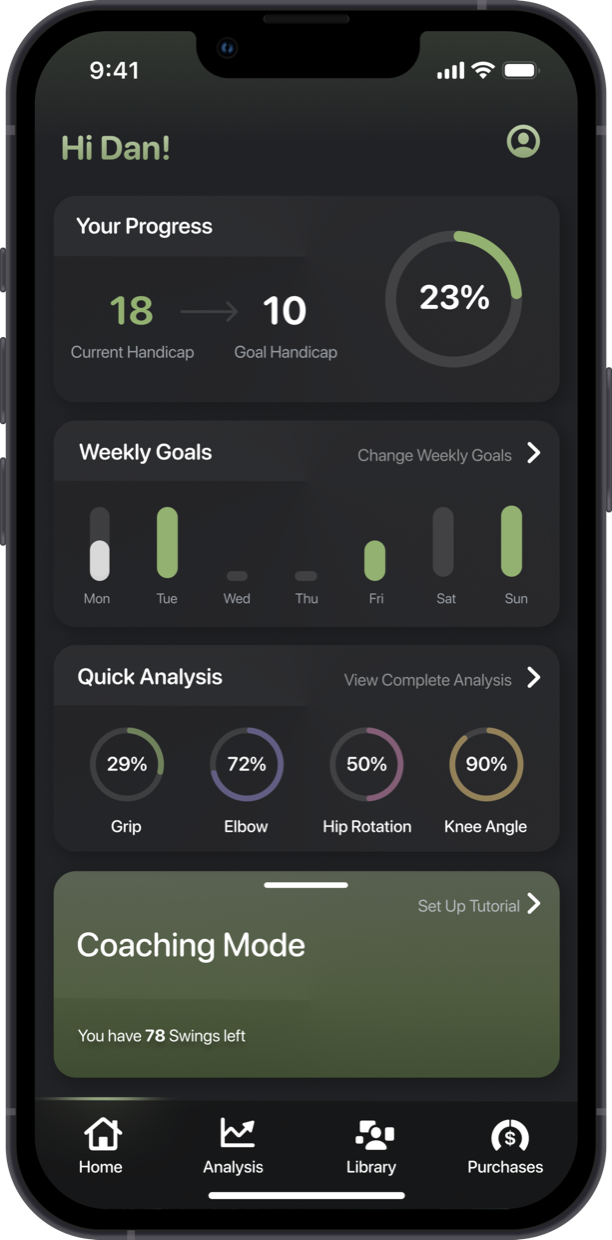
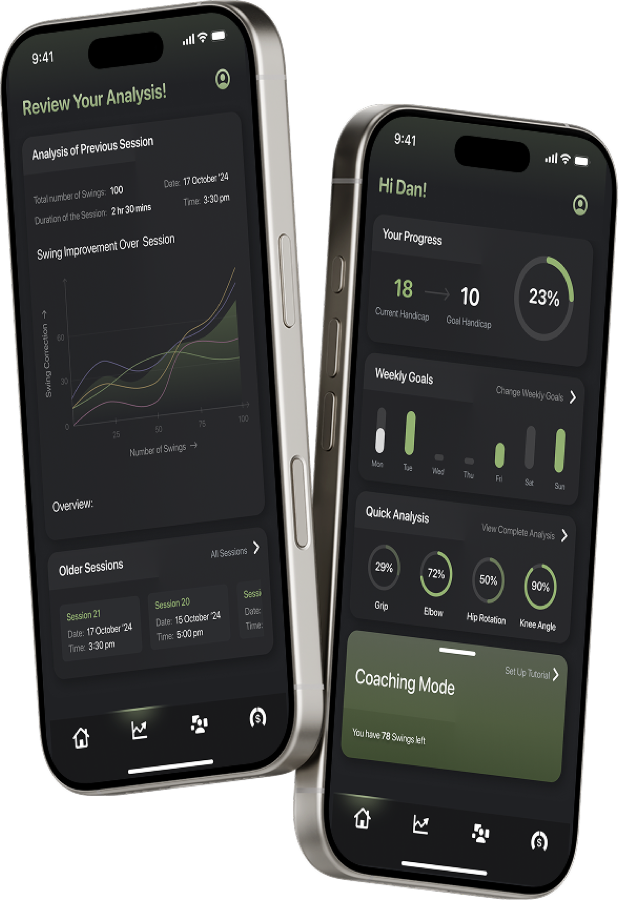
Step 1 · Home page
One big button, because you’re standing at the range.
Coaching Mode card
The largest target on Home; one tap starts a session.
“78 swings left”
Swing credits: you pay for practice, not a subscription you forget.
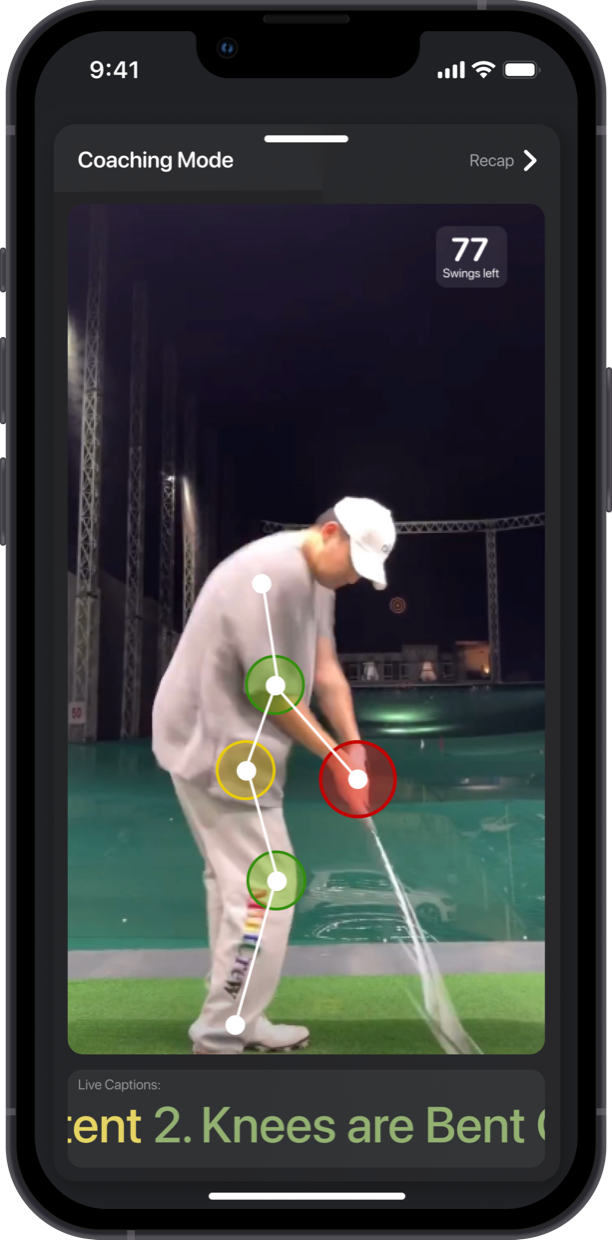
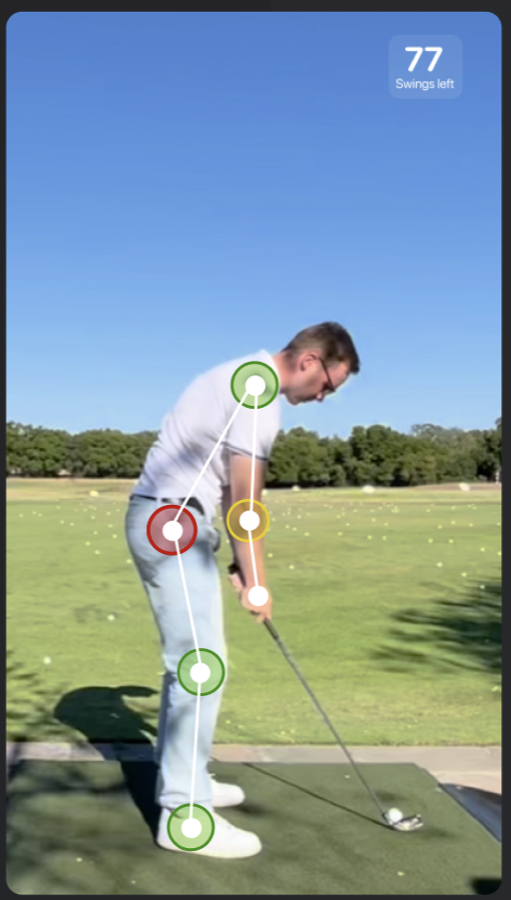
Step 2 · Coaching mode
The camera watches. You just swing.
Pose checkpoints
Green and red dots on grip, elbow, hip and knee.
Live caption
Every spoken cue is also captioned.
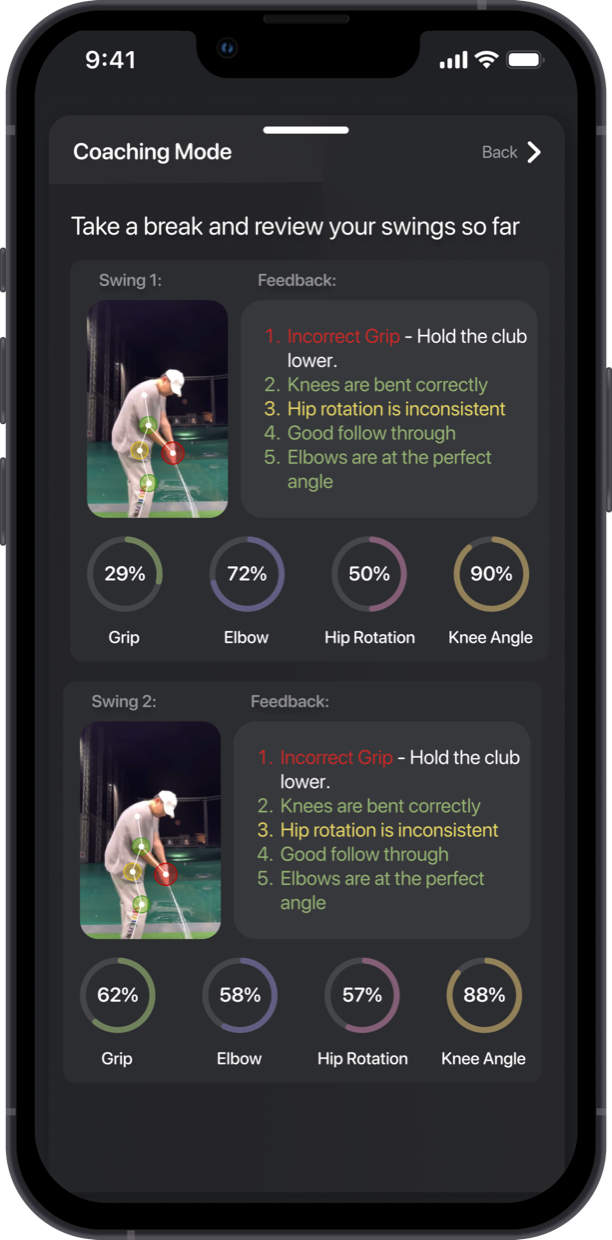
Step 3 · See
Deeper analysis mid-session.
Four rings
Each factor is scored 0–100%, so you can see which one the coach is talking about.
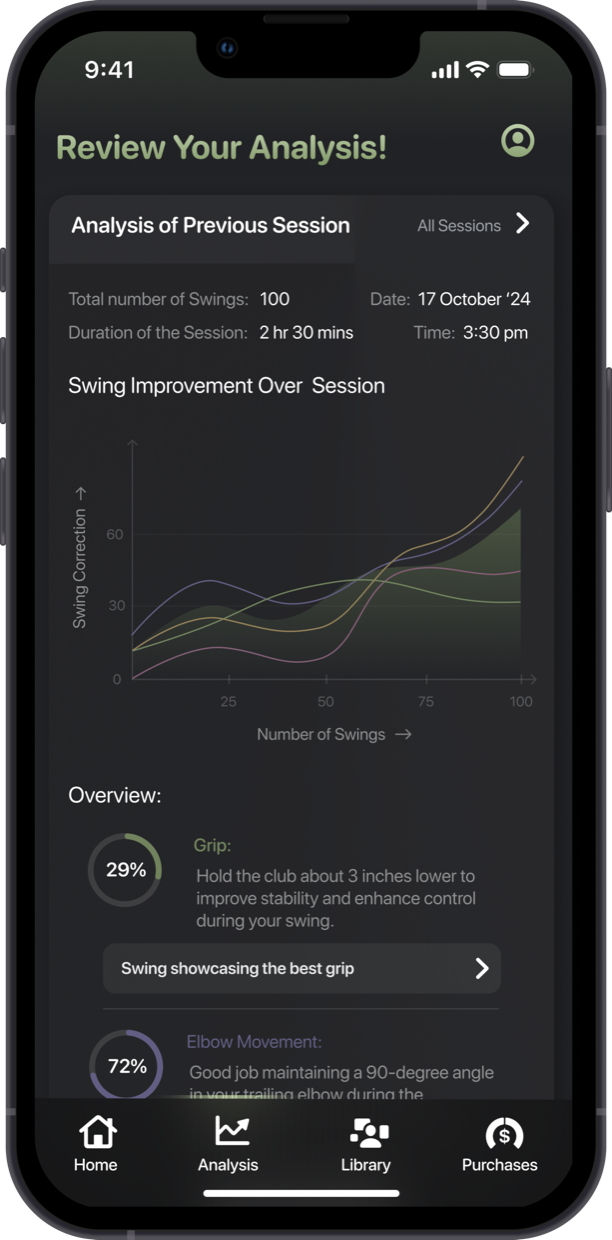
Step 4 · Analysis tab
Progress you can actually see.
Swing improvement graph
Each factor tracked across the session: proof the practice is working.
Session history
Every past session is saved, so this week can be compared to last.
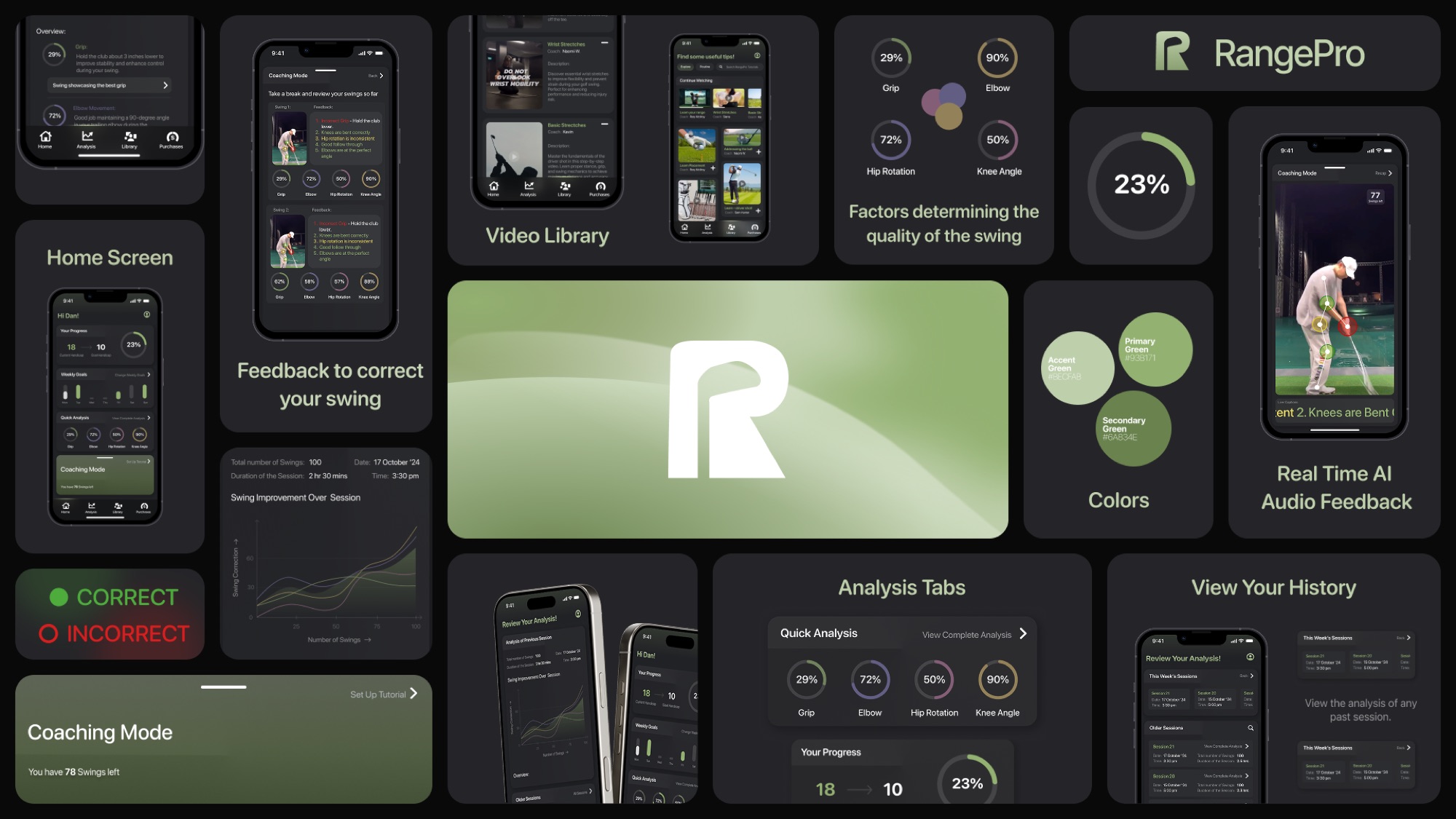
Hear it. Fix it. Swing.